

Mobile App Testing From Codex — Executable Checks From Natural Language
Codex-class agents are strongest when the repository is the source of truth. FinalRun gives those agents structured output — YAML tests and machine-readable reports — instead of one-off shell hacks. Whether you ship Kotlin, Swift, Dart, or JavaScript bundles, the goal is the same: prove critical user journeys before release.
What Codex can automate
- Parse manifests for packageName / bundleId
- Populate
.finalrunand feature folders - Retry with minimal diffs when a step fails
FinalRun: Mobile testing that fits how you already build
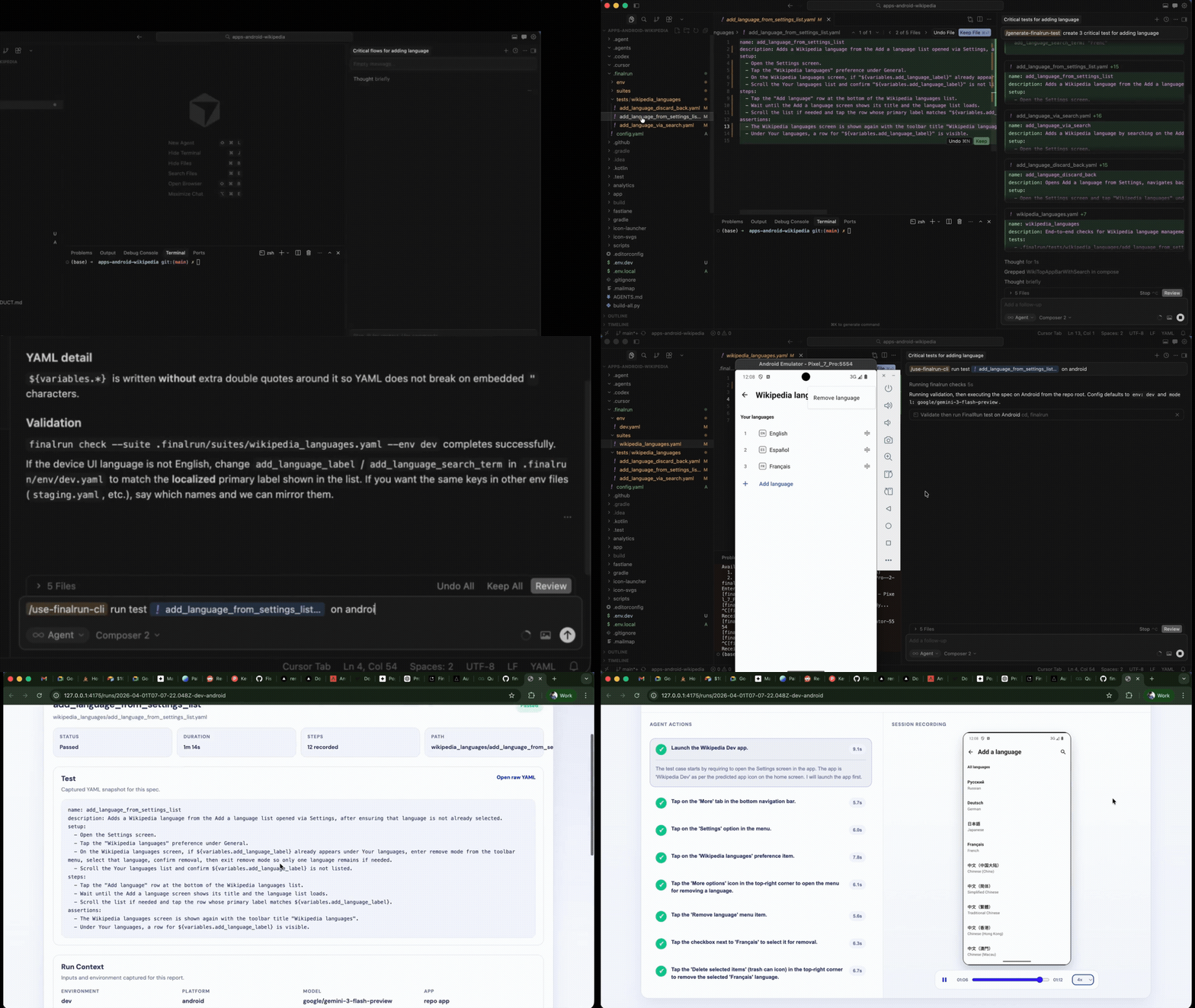
FinalRun is a free, open-source CLI for cross-platform mobile apps. You describe flows in plain English using YAML steps; an AI model drives simulators and emulators using vision, which reduces time spent maintaining brittle selectors.
- Works with chat-driven and headless agent runners
- Keeps test intent in version control
Works with AI coding agents (Cursor, Claude Code, Codex, Google AntiGravity)
Install once, then stay in your agent session:
curl -fsSL https://raw.githubusercontent.com/final-run/finalrun-agent/main/scripts/install.sh | bash
Generate tests from your repo:
/finalrun-generate-test Add YAML coverage for the main user journey — include edge cases
Run tests and auto-fix failures:
/finalrun-test-and-fix Verify the critical flow end-to-end on iOS and Android
Your agent can scaffold .finalrun config, organize tests by feature, read reports (screenshots, video, logs), and narrow fixes to application code versus test specs.
Get started on GitHub · Documentation · Community
Or Set It Up Manually
Prefer to manage your FinalRun workspace and test scripts yourself? Here is how.
- Configure your workspace — create a
.finalrun/config.yamlin your project:
app:
  name: MyApp
  packageName: com.example.myapp
  bundleId: com.example.myapp
-
Write tests in plain English — save YAML files in
.finalrun/tests/. Each file describes one user flow to test. -
Run:
finalrun test tests/registration.yaml
FinalRun launches your app on an emulator or simulator, executes each step using AI vision, and generates a detailed report with pass/fail status, video recording, and step-by-step screenshots.
Works with Every Mobile Framework
FinalRun's AI vision approach means it works with any app, regardless of how it was built:
- Native Android (Kotlin, Java)
- Native iOS (Swift, SwiftUI, UIKit)
- React Native
- Flutter
- Expo
- Kotlin Multiplatform
- Ionic and Capacitor
Since the AI looks at pixels, not code, it does not matter what framework generated the UI.
CI pipelines and reproducible runs
Treat FinalRun like any other CLI in continuous integration: pin tool versions, upload report directories as workflow artifacts, and associate each run with a commit SHA. For Mobile apps, document which emulators or simulators you use (and, on Android, how ADB connects to devices) so local runs match CI. Readable runbooks help new contributors reproduce failures without guessing.
What quality means for Mobile apps
Quality goes beyond a green build: functional correctness, resilience on bad networks, accessibility (large text, screen readers), and observability when something breaks. Spend E2E budget on authentication, payments, permissions, and deep links — the flows that cost you users when they fail.
Ownership and triage
Treat FinalRun specs like application code — review them in PRs and update expected_state when navigation changes. Video shows gesture timing, screenshots show UI state, logs show crashes. Use those artifacts in triage instead of piling on retries.
Security and test data
Use sandbox accounts, synthetic data, and secrets managers. Never embed API keys in YAML. Redact tokens from shared artifacts.
Feature flags and parity
Document which flag state each spec assumes. If you ship on both Android and iOS, note where journeys must match and where differences are intentional. Pin SDK levels, system images, and CLI versions so failures are reproducible.
Before you merge
- Config and tests live in version control beside application code
- Steps describe user-visible copy, not internal element IDs
- CI uploads artifacts tied to commit SHAs
- Triage failures with video first, then logs
- Secrets never appear in checked-in YAML
Frequently asked questions
How is FinalRun different from only using Appium or native drivers?
FinalRun uses vision and natural-language steps instead of maintaining every locator by hand. Many teams pair deterministic unit or integration checks with FinalRun for flows that change often.
Is FinalRun free?
The FinalRun agent is open source (Apache 2.0). You bring your own model provider where applicable and pay for compute and CI like any serious test stack.
Does this replace Codex workflows entirely?
It replaces repeated manual reruns and brittle script churn for many teams, and plugs into the same pull-request and CI habits you already use.