
iOS App Testing in Delhi
Delhi is home to a massive startup ecosystem in Gurgaon and Noida, with growing mobile-first companies. If you are building iOS apps in Delhi, Delhi NCR, you know the stakes: a single bug in your App Store submission can mean a 1 to 3 day rejection cycle, plus the cost to your team's momentum. Thorough testing is not optional — but it does not have to mean expensive agencies or brittle XCUITest scripts.
The iOS Testing Bottleneck
iOS developers face testing challenges unique to Apple's ecosystem:
- App Store review delays — A rejected submission costs 1 to 3 additional review days. Crashes, broken flows, or UI glitches that testing should have caught are the most common causes
- Device and screen sizes — iPhone SE to iPhone 16 Pro Max, iPad Mini to iPad Pro — each with different layouts, safe areas, and Dynamic Type settings
- iOS version support — Most apps support iOS 16 through 18, each with different privacy prompts, permission flows, and system behavior
- Privacy and permissions — Location, camera, photos, notifications, tracking — each permission has a system dialog that needs testing
- SwiftUI vs UIKit — Many apps use both frameworks. Testing tools that rely on the view hierarchy often struggle with this mix
These challenges are why QA agencies in Delhi charge premium rates for iOS testing. But there is a more efficient alternative.
Traditional iOS Testing Approaches
XCUITest — Apple's built-in UI testing framework. Deeply integrated with Xcode, but tests are written in Swift, tied to accessibility identifiers, and break with every significant UI change. Setting up test targets and schemes adds maintenance overhead.
Detox — Popular for React Native apps. JavaScript-based with good CI support, but limited to React Native and has complex setup requirements.
QA Agencies — Manual and automated testing outsourced to a team. Costs $5,000 to $15,000 per month. Results take 2 to 5 business days per test cycle.
The common thread: these approaches break when your UI evolves. Every design change, every new screen, every refactor means updating test code or waiting for your agency to catch up.
AI-Powered iOS Testing with FinalRun
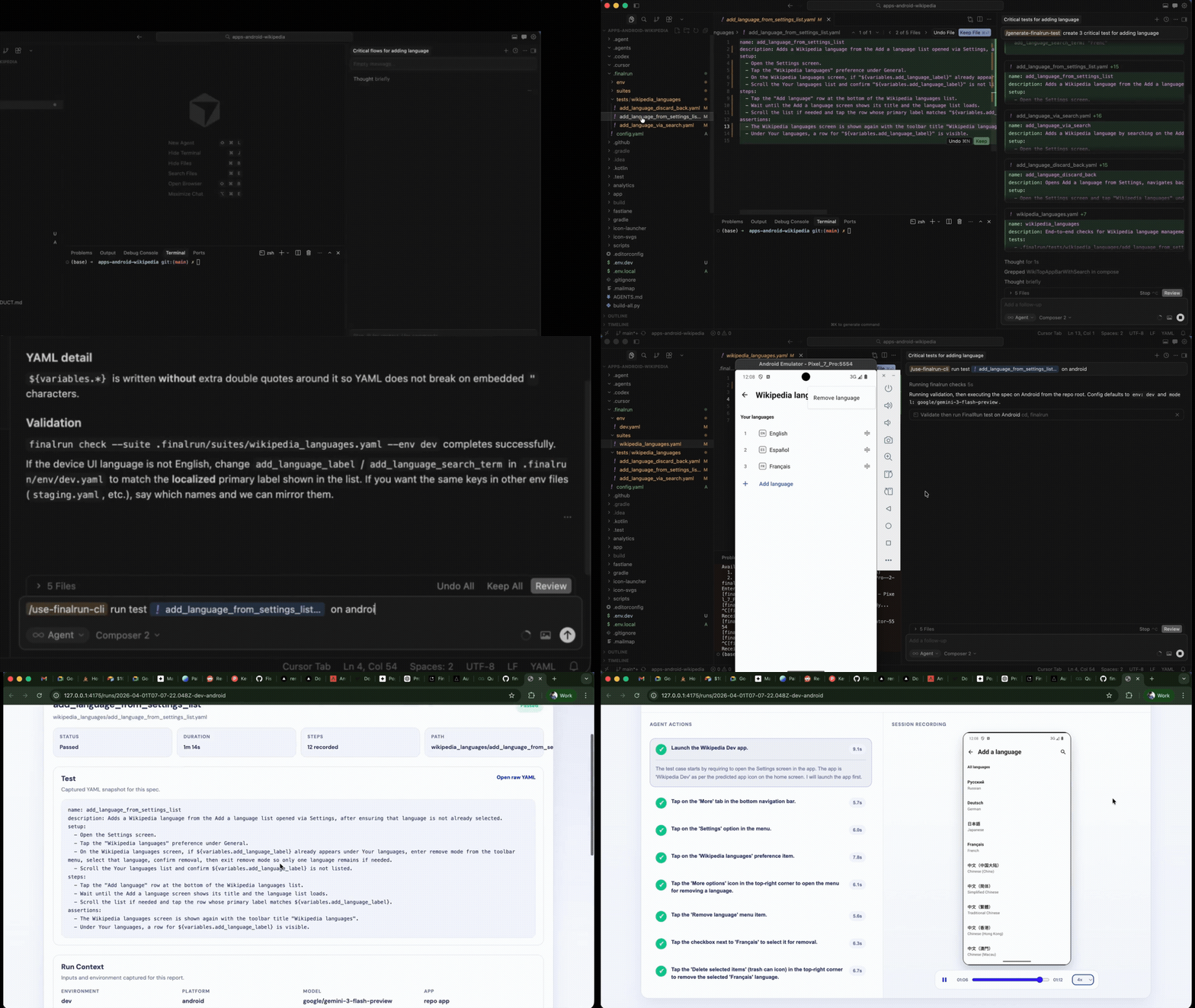
FinalRun replaces test scripts with plain English. Write what your app should do, and an AI model performs each action on an iOS simulator — seeing the screen exactly like a real user would.
name: Photo sharing flow
steps:
  - "Tap the camera icon in the bottom tab bar"
  - "Allow photo library access if prompted"
  - "Tap 'Choose from Library'"
  - "Select the first photo"
  - "Add the caption 'Weekend adventure'"
  - "Tap 'Share'"
  - "Wait for the confirmation message"
expected_state:
  - "The post appears in the feed"
  - "The caption 'Weekend adventure' is visible"
  - "The photo is displayed correctly"
No Swift test code. No accessibility identifiers. No XPath or element selectors. The AI sees your app's screen and interacts with it visually. When you redesign a screen or refactor from UIKit to SwiftUI, the test still works.
FinalRun vs Traditional iOS Testing
| XCUITest | Detox | QA Agency | FinalRun | |
|---|---|---|---|---|
| Test language | Swift | JavaScript | N/A | Plain English YAML |
| Setup | Xcode targets, schemes | Complex, React Native only | None (outsourced) | npm install |
| UI change resilience | Breaks (ID-based) | Breaks (selector-based) | Manual update | AI adapts automatically |
| Framework support | UIKit, SwiftUI | React Native only | Any | Any (vision-based) |
| Cost | Developer time | Developer time | $5K – $15K/month | Free + LLM API key |
| CI/CD support | Xcode Cloud, Fastlane | Yes | Rarely | Yes |
| Reports | Xcode test reports | Jest output | PDF, weekly calls | Video, screenshots, device logs |
Get Started with AI Coding Agents
Building your iOS app with an AI coding agent like Claude Code, Cursor, or Codex? You can install FinalRun and start testing without leaving your editor.
Install FinalRun:
curl -fsSL https://raw.githubusercontent.com/final-run/finalrun-agent/main/scripts/install.sh | bash
Or just ask your AI agent to install and set up FinalRun using the finalrun-agent repo — it will handle everything for you.
Generate iOS tests from your source code:
/finalrun-generate-test Generate tests for the photo sharing feature — cover upload, caption, and feed display
Your AI agent reads your Swift source code, detects your bundleId from the Xcode project, sets up the FinalRun workspace, and creates YAML test specs organized by feature folder.
Run tests and auto-fix failures:
/finalrun-test-and-fix Verify the photo sharing flow end-to-end on iOS
The agent runs your tests on an iOS simulator, reads the results (screenshots, video, device logs), classifies whether the bug is in your app code or the test spec, applies the narrowest fix, and re-runs until the suite is green.
Build a feature, generate and run tests with one command, and have failures auto-diagnosed and fixed — all without leaving your editor. No manual QA handoff. No Xcode test target setup. No agency.
Or Set It Up Manually
Prefer to manage your FinalRun workspace and test scripts yourself? Here is how.
# Set up your workspace
cd your-ios-project
mkdir -p .finalrun/tests

# Configure
echo 'app:
  name: MyApp
  bundleId: com.example.myapp' > .finalrun/config.yaml

# Write a test in .finalrun/tests/photo-sharing.yaml
# Then run it
finalrun test .finalrun/tests/photo-sharing.yaml
FinalRun launches your app on an iOS simulator, executes each step using AI vision, and generates a detailed report. You get video recording of the entire test run, screenshots at every step, and full device logs.
Frequently Asked Questions
Does FinalRun work with SwiftUI?
Yes. FinalRun uses AI vision — it looks at pixels, not the view hierarchy. It works the same whether your app uses SwiftUI, UIKit, or a combination of both.
Can I test iPad layouts?
Yes. FinalRun runs on any iOS simulator, including iPad. The AI adapts to the screen size and layout automatically.
How does FinalRun handle iOS permission dialogs?
Include permission handling in your test steps, for example "Allow camera access if prompted." The AI recognizes and interacts with system dialogs just like any other UI element.
Does it work with apps built in Flutter or React Native?
Yes. Since FinalRun uses visual AI, it works with any framework that renders to the iOS screen — native Swift, React Native, Flutter, Expo, Ionic, and more.
Can I test push notifications?
FinalRun can verify notification-related UI within your app. For system-level notification testing, you can combine FinalRun tests with simulator notification payloads.
Ship to the App Store with confidence. FinalRun gives iOS teams in Delhi fast, reliable testing without XCUITest complexity or agency overhead.
Get started with FinalRun | Documentation | Join the Community