

Android App Testing in Charlotte
Charlotte is a major financial center with a growing tech sector focused on fintech and enterprise mobile applications. If you are building Android apps in Charlotte, North Carolina, you know the platform's biggest challenge: testing across thousands of device and OS combinations. Traditional approaches — from hiring QA agencies to writing Espresso or Appium scripts — are expensive and fragile. Here is how AI-powered testing changes the equation.
Why Android Testing Is Uniquely Difficult
Android's ecosystem presents testing challenges that no other platform has:
- Device fragmentation — Over 24,000 distinct Android device models are in active use worldwide, each with different screen sizes, resolutions, and hardware
- OS version spread — Android 12 through 15 are all in active use, and each version handles permissions, notifications, and UI differently
- Manufacturer overlays — Samsung One UI, Xiaomi MIUI, Google Pixel UI, and others change the look and behavior of system components
- Play Store requirements — Google's pre-launch reports catch crashes, but they do not test your actual user flows
This fragmentation is why Android QA agencies in Charlotte charge what they do. But you do not need an agency to solve this problem.
Traditional Android Testing Approaches
Espresso — Google's in-house UI testing framework. Fast and tightly coupled to your app's code, but tests are written in Kotlin or Java, require deep knowledge of the view hierarchy, and break whenever the UI changes.
Appium — A cross-platform automation framework. Supports Android and iOS with one API, but setup is complex, tests are slow, and maintaining selectors across devices is a constant battle.
QA Agencies — Outsourced manual and automated testing. Typically $5,000 to $15,000 per month for Android coverage. Turnaround is 2 to 5 business days per test cycle.
All three approaches share the same problem: they are brittle. When your UI changes — which happens every sprint — tests break and need manual updates.
AI-Powered Android Testing with FinalRun
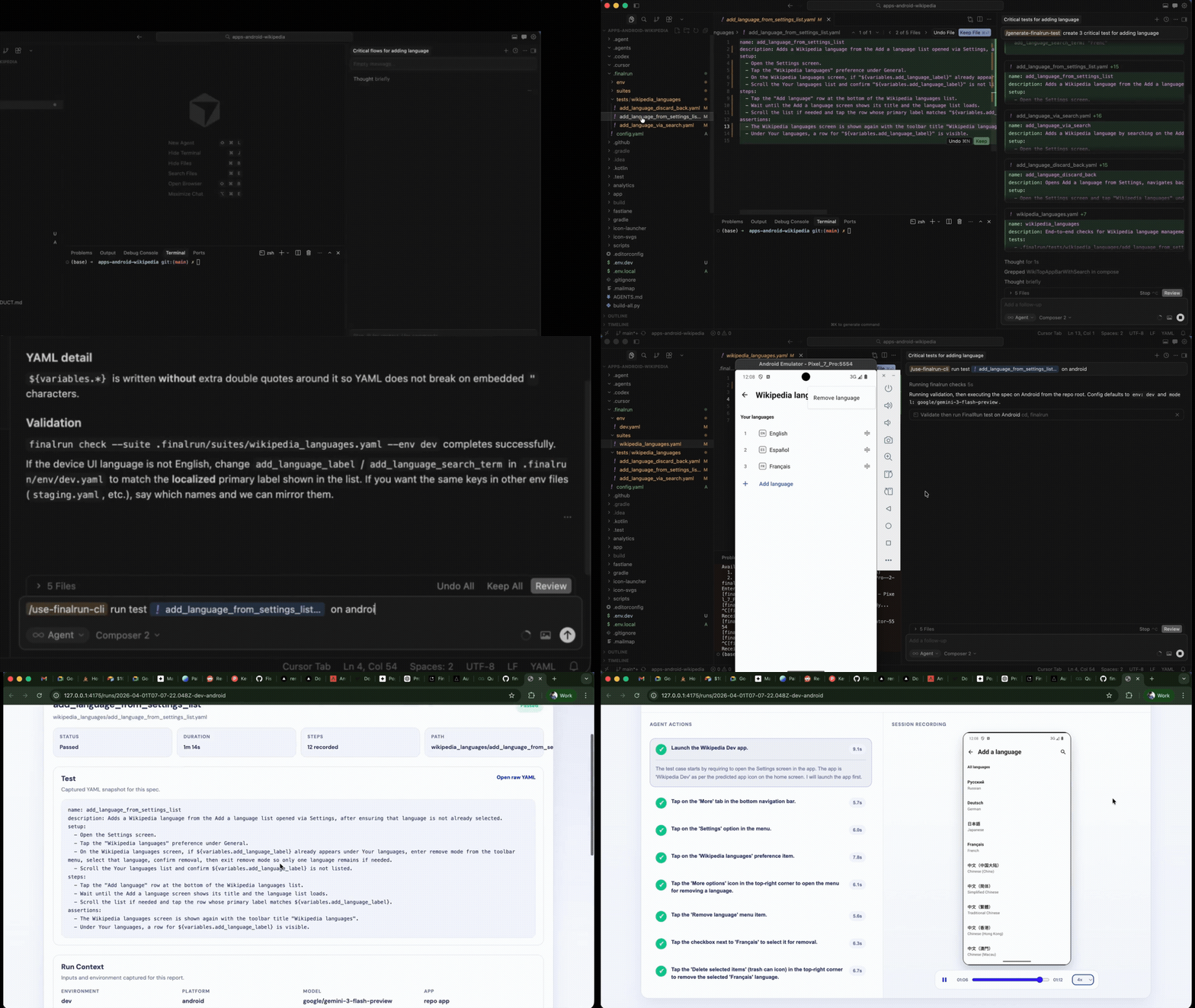
FinalRun takes a fundamentally different approach. Instead of targeting UI elements by ID, XPath, or accessibility label, you describe what to test in plain English. An AI model (Gemini, ChatGPT, or Claude) looks at your app's screen and performs each action visually.
name: Add item to shopping cart
steps:
  - "Scroll down until you see 'Running Shoes'"
  - "Tap on the 'Running Shoes' product"
  - "Select size 10 from the size picker"
  - "Tap 'Add to Cart'"
  - "Tap the cart icon in the top right corner"
expected_state:
  - "The shopping cart shows 1 item"
  - "'Running Shoes' is listed with size 10"
  - "The correct price is displayed"
The AI does not care whether the button is a MaterialButton, a Jetpack Compose Button, or a custom View. It sees "Add to Cart" on screen and taps it. When you redesign your product page, the test still works — because the AI reads the screen like a human does.
FinalRun vs Traditional Android Testing
| Espresso | Appium | QA Agency | FinalRun | |
|---|---|---|---|---|
| Test language | Kotlin/Java | Java/Python/JS | N/A | Plain English YAML |
| Setup complexity | Moderate | High | None (outsourced) | npm install |
| Handles UI changes | Breaks | Breaks | Manual update | AI adapts automatically |
| Device coverage | Emulator only | Multi-device, fragile | Depends on agency | AI vision works on any screen |
| Cost | Developer time | Developer time | $5K – $15K/month | Free + LLM API key |
| CI/CD support | Yes | Yes | Rarely | Yes |
| Report output | JUnit XML | Custom | PDF reports | Video, screenshots, device logs |
Get Started with AI Coding Agents
Building your Android app with an AI coding agent like Claude Code, Cursor, or Codex? You can install FinalRun and start testing without leaving your editor.
Install FinalRun:
curl -fsSL https://raw.githubusercontent.com/final-run/finalrun-agent/main/scripts/install.sh | bash
Or just ask your AI agent to install and set up FinalRun using the finalrun-agent repo — it will handle everything for you.
Generate Android tests from your source code:
/finalrun-generate-test Generate tests for the shopping cart — cover add to cart, update quantity, and checkout
Your AI agent reads your Android source code, detects your packageName from the manifest, sets up the FinalRun workspace, and creates YAML test specs organized by feature folder.
Run tests and auto-fix failures:
/finalrun-test-and-fix Verify the shopping cart flow end-to-end on Android
The agent runs your tests on an Android emulator, reads the results (screenshots, video, device logs), classifies whether the bug is in your app code or the test spec, applies the narrowest fix, and re-runs until the suite is green.
Build a feature, generate and run tests with one command, and have failures auto-diagnosed and fixed — all without leaving your editor. No manual QA handoff. No waiting for an agency.
Or Set It Up Manually
Prefer to manage your FinalRun workspace and test scripts yourself? Here is how.
# Set up your workspace
cd your-android-project
mkdir -p .finalrun/tests

# Configure
echo 'app:
  name: MyApp
  packageName: com.example.myapp' > .finalrun/config.yaml

# Write a test in .finalrun/tests/add-to-cart.yaml
# Then run it
finalrun test .finalrun/tests/add-to-cart.yaml
FinalRun connects to your Android emulator via ADB, installs your APK, launches the app, and runs each test step using AI vision. You get a full report with video recording, screenshots at every step, and device logs.
Frequently Asked Questions
Does FinalRun work with Jetpack Compose?
Yes. FinalRun uses AI vision to see the screen. It works the same whether your UI is built with Compose, XML layouts, or any other framework.
Can I test on real Android devices?
Yes. FinalRun supports both Android emulators and physical devices connected via ADB.
What about app permissions like camera, location, and storage?
FinalRun handles Android permission dialogs. Your test can include steps like "Allow camera access when prompted" and the AI will tap the appropriate button.
How does FinalRun handle different screen sizes?
The AI adapts to whatever screen it sees. You do not need separate tests for phones and tablets — the same test works across device sizes.
Stop fighting fragmentation with fragile test scripts. FinalRun gives Android teams in Charlotte a faster, more reliable way to test across devices without the cost of an agency or the complexity of Espresso and Appium.
Get started with FinalRun | Documentation | Join the Community